Captions
Captions are the easiest part. All the work is pretty much already done for you, your’e just rewriting it with keywords.
And before we get into caption theory. I want you to ask yourself one question:
When is the last time, genuinely, that you ACTUALLY took the time to read a caption?
(not including those awful “5 tips I learn about X - read caption…” videos.)
Exactly. I couldn’t tell you either.
Because honestly, captions don’t really matter that much. (outside of what I cover below.)
What really matters is good videos, which you now should know how to make. (your welcome.)
So that’s why I follow this exact same structure every-time.
It takes me about 5 minutes and I always get a solid SEO ranking.
Hook
You want a one line summary of what the video was about. I typically do something similar to what’s in the thumbnail with a bit of variation.
For example: If thumbnail said, ”The best viral hooks.” the caption would say, ”How I write viral storytelling hooks every time.”
Yes I do just slap keywords in there and no, no one cares. Don’t get ChatGPT about it, but the only purpose of the caption is SEO.
You can have fun with this, I’ve been on a 6 week run of putting dinosaur emojis in my captions and no one has noticed.
Episode # (if applicable)
Something like “[TITLE OF SERIES] #.]”
CTA
This is literally verbatim what I say in the video. I just make it bleed into the context.
So if the call to action was: “Comment [KEYWORD] for my full storytelling guide.”
The caption would read: “Comment [KEYWORD] for my full storytelling guide to make your videos have higher retention and watch time and be more cinematic in the Instagram reels feed.”
Dead serious.
Context with keywords
This is the part I really let the keywords fly in.
It’s basically re writing the script but it’s much shorter, only includes the value, and you’re throwing in a keyword every 4-5 words.
It’s ok if they don’t sound super eloquent, again that’s not the point.
Examples:
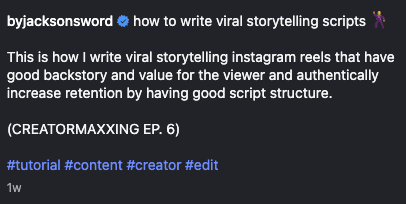
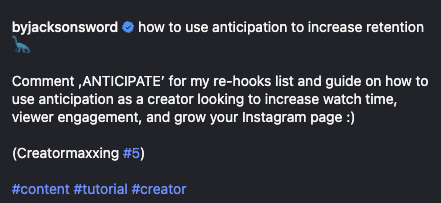
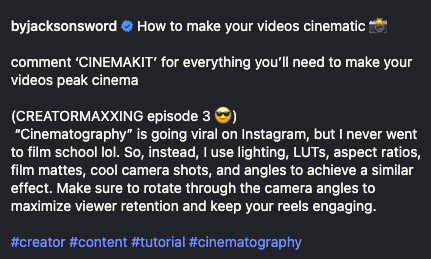
3-5 Hashtags
This is old news at this point but hashtags are dead. They work mediocre at best.
What I do is just put that little pound sign in front of the keywords I think relate to all of my videos the most.
So things like #content, #tutorial, #creator — you get it.
They supposedly work better on TikTok, but again → quality watch time will ALWAYS be what these platforms want.
The only stipulation to writing captions like this is MAYBE found within educational carousels. But those don’t really build a brand like talking on camera does and I’ve never posted one because I think they’re meh.